About
ARC Line - ARC Raiders Multi-Hotline Voice System
2025-12-11 UPDATE: Three others and I were selected as winners of the hackathon! See this official Discord post for details.
Site submission: arcline.vercel.app
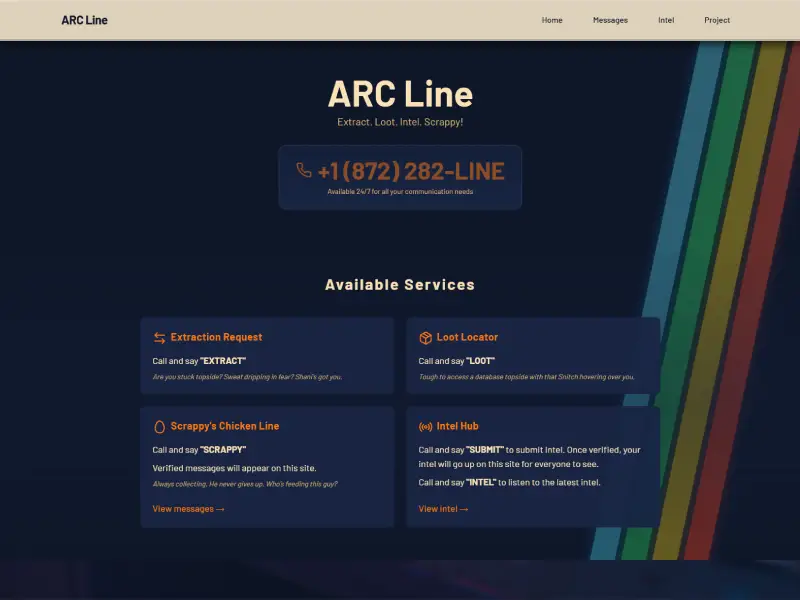
A voice-based hotline system for the ARC Raiders universe, built with Twilio's ConversationRelay. Users call a single phone number +1 (872) 282-LINE and speak their selection:.
Features
- 🚁 "Extract" will get Shani to pretend to initiate an extraction which is familiar to players of ARC Raiders.
- 📦 "Loot" will have Shani ask what kind of items or resources the user is looking for. The user's prompt will then be processed by Perplexity to search the web for the most up-to-date information on where the loot the user is looking for is found in ARC Raiders.
- 🐔 "Scrappy" will allow the user to leave a message for Scrappy - the loot collecting rooster of ARC Raiders. These messages are moderated by a human moderator (me) before going live on the arcline.vercel.app site. I intentionally designed the system to require me to moderate, rather than having AI determine if the message was appropriate or not. I felt there were too many ways a user could post something inappropriate to work out a filter with Perplexity to decide whether or not to allow the message to go live.
- 📢 "Submit" will allow the user to send a message to ARC Line which is then approved by a human moderator (me) - again for the same reasons as stated above. Intel would be something interesting of note in the game - such as advice, or a joke, or something creative that relates to the ARC Raiders game.
- 📢 "Intel" will pick an approved intel message that's saved in the database and have Shani repeat it back to the user.
How It Works - The Phone Call
- Registered number with Twilio: Multi-step process of registering an account with Twilio and then finding an open, reserved number to use for the hotline.
- Call Initiation: When a user calls the Twilio phone number, Twilio requests the `/twiml` endpoint, which returns TwiML instructions to connect to the WebSocket server. The endpoint (all of the server code) is hosted by Heroku (no WebSocket support available from Vercel).
- WebSocket Connection: Twilio connects to the `/ws` WebSocket endpoint, establishing a persistent connection for the call.
- Menu Selection: The system presents a voice menu and routes based on voice input.
- Hotline Routing: Based on the voice prompt from the user, the system routes to the appropriate hotline handler by speaking: "Extraction" (extraction request), "Loot" (loot locator), "Scrappy" (Scrappy's Chicken Line), "Submit"/"Intel" (faction news)
- Conversation Flow: Each hotline handler manages its own conversation flow using a state machine pattern with memory persistence.
Technical Architecture
The application is built with a modern tech stack:
- Backend: Node.js with TypeScript and Fastify web server for high-performance request handling
- Real-time Communication: WebSocket support for Twilio ConversationRelay, enabling bidirectional voice communication
- Database: Supabase for data persistence, storing user interactions and system state
- Deployment: Vercel serverless functions, making the entire system serverless and scalable
- Voice: ElevenLabs for natural-sounding voice synthesis
- Styling: Tailwind CSS for the web app and administrative dashboard
Project Structure
The project is organized into three main directories:
- server: Node.js server application with WebSocket support
- client: Optional React web application
- docs: Documentation including database schema and deployment guides
- dashboard: Administrative dashboard views giving insight to user voice input
Deployment
There are two deployments for the project:
- Web app is deployed on Vercel
- Server code is deployed on Heroku (there was a limitation of no WebSockets support with Vercel)
- The dashboard is only used locally on my machine for security purposes and there's no real need to have it deployed in a production environment in its current state
Challenges and Solutions
Building a multi-hotline voice system presented several interesting challenges:
State Management: Each hotline needed to maintain its own conversation state while allowing users to navigate between different services. The solution was implementing a state machine pattern with persistent memory, ensuring smooth transitions and context preservation.
Real-time Communication: WebSocket connections require careful handling to ensure reliability. By leveraging Twilio's ConversationRelay API, we could focus on the application logic rather than low-level connection management.
Voice Recognition: Processing voice input accurately was crucial for the user experience. The system needed to handle various accents, background noise, and different speaking styles while maintaining fast response times. Given the scope of the project, I couldn't test various accents or background noise other than I could produce at home.
AI-Assisted Development
One of the most valuable aspects of building ARC Line was leveraging AI tools throughout the development process. I started by creating comprehensive prompts that outlined the entire project architecture, feature set, and technical requirements. These initial documents served as a blueprint, covering everything from the high-level system design to specific implementation details.
As the project evolved, I recursively updated these documents, refining the architecture and features based on what I learned during development. This iterative approach allowed me to:
Plan Before Building: The initial comprehensive prompts helped me think through the entire system before writing a single line of code, identifying potential challenges early.
Maintain Focus: Having a clear architectural plan kept the project on track.
Iterate Effectively: By continuously updating the documentation as I refined the project, I maintained a clear record of decisions and changes, making it easier to understand why certain choices were made.
Reach Production Quality: The recursive refinement process ensured that the final implementation matched the production-ready vision outlined in the initial plans.
This AI-assisted workflow proved to be incredibly effective, transforming what could have been a chaotic development process into a structured, methodical journey from concept to production-ready application.
Lessons Learned
This project taught me a lot about building production-ready voice applications:
User Experience Matters: Even in a voice-only interface, UX principles apply. Clear prompts, intuitive navigation, and helpful error messages make all the difference.
State Machines Are Powerful: Using state machines for conversation flow made the code more maintainable and easier to debug.
Platform Exploration: Learning about Heroku and deploying an app on it was a valuable experience that expanded my understanding of different deployment platforms and their unique capabilities.
Twilio Limitations: While Twilio ConversationRelay is powerful, I encountered several limitations that shaped the project:
- Single Voice Constraint: Only one AI voice can be used per conversation (I chose ElevenLabs). I initially envisioned different personas for users to interact with, but this limitation required simplifying the design to a single character voice.
- No Sound Layering: Adding atmospheric sound effects or ambient background music wasn't possible. While ElevenLabs supports sound effects and music, there's no way to layer them with voice in the ConversationRelay context. I suspect this is more likely a limitation of phone line audio capabilities rather than Twilio specifically.
- Audio Quality Challenges: Phone audio is low bandwidth, leading to broken or unclear audio at times. Voice recognition was particularly fragile—for example, "loot" was frequently misinterpreted as "lute", "boot", "flute", or "click". I had to implement exception patterns and fallback logic to ensure the correct hotline handler was triggered despite recognition errors.
- DTMF Not Supported: Twilio supports DTMF (Dual-Tone Multi-Frequency) tones for traditional "Press 1 for..." interactions, but this feature isn't available in ConversationRelay. I originally designed the hotline to use numeric keypad input, but had to pivot to voice-only navigation instead.
This project is open source and available on GitHub, so feel free to explore the code, contribute, or use it as inspiration for your own voice applications.